Process: Set of instructions loaded in a memory
| Command | Action |
|---|---|
| ps x | Show all of your running processes. |
| ps ax | Show all processes on the system, not just the ones you own |
| ps u | Include more detailed information on processes. |
| ps w | Show full command names, not just what fits on one line |
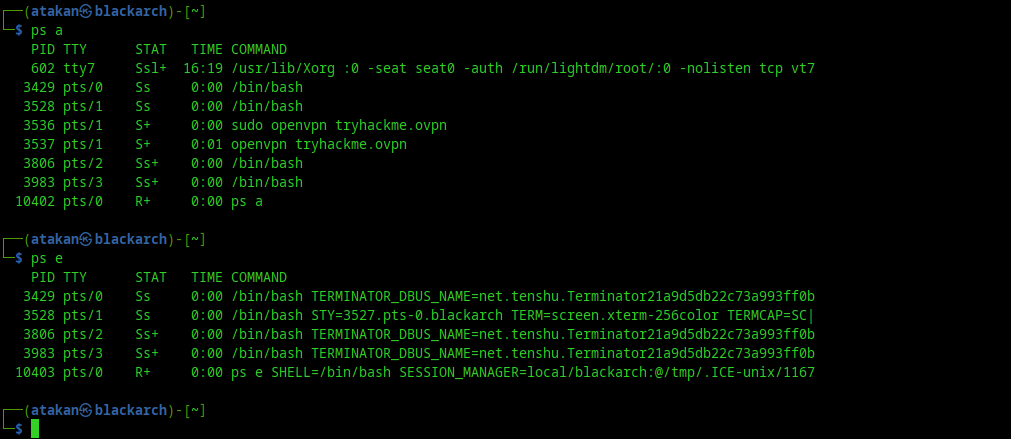
ps a: All terminals
ps e: List of all processes
ps o: Custom properties
ps ef: List of all processes in all TTYs
 OUTPUT MEANING
-
Top output
PR: Priority
NI: Nice
VIRT: Virtual memory
RES: Physical memory
SHR: Shared memory
S: State
TIME: Total timefo
PPID: Parent PID
C: CPU
STIME: Start time
To start a job in background, type & at the end of the command and then use disown to disconnect the job from the terminal. To put a foreground job to background, Ctrl+Z, bg and disown.
Process Stats
STAT or S
-
D-uninterruptible sleep (usually IO error): If a process can’t access to the system (overload, IO error, poor RAM etc.) it makes its stat D.
-
R-running: This is a state where a process is either in running or ready to run
-
S-interruptible sleep: Waiting for an event to complete. Bildigimiz sleep iste
-
T-stopped: Once the process is completed, this state occurs. This process can be restarted.
-
Z-defunct(zombie): In this state, the process will be terminated and the information will still be available in the process table. (For example A process is the parent of B process and B process is used by some application. If A process is killed, normally B would also be killed but because its used by some app, it will go to state Z) A zombie process is a process whose execution is completed but it still has an entry in the process table
-
W-paging: Moving in or out of swap (page in - page out)
-
More state
< high-priority (not nice to other users)
N low-priority (nice to other users)
L has pages locked into memory (for real-time and custom IO)
s is a session leader
l is multi-threaded (using CLONE_THREAD, like NPTL pthreads do)
+ is in the foreground process group
PS Custom
tty,comm,pid,nice,%mem,%cpu
Nice
Nice is the priority of the process. -20 to 19. -20 means it is the highest priority
renice: Change the nice value of process
NOTE: If TTY value is ? then it means that process isn’t started by a user. It is system or kernel process
-
Priority ve nice
Nice value is a user-space and priority PR is the process’s actual priority that use by Linux kernel. In linux system priorities are 0 to 139 in which 0 to 99 for real time and 100 to 139 for users. nice value range is -20 to +19 where -20 is highest, 0 default and +19 is lowest. relation between nice value and priority is : PR = NI + 20
fg: Foreground last process
bg: Background last process
%1: Job 1