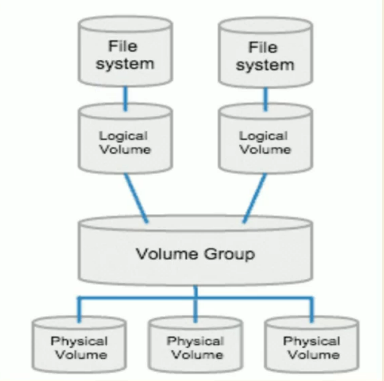
 | - Extent: A 4 mb chunk of a volume group - PE: Partition extent - LE: Logical extent |
|---|
Logical Volume Types:
- Linear Volume: Default volume. Physical disks are concatenated. First write on first disk until disk is full. Then, move to the second disk.
- Striped Volume: Distribute data to multiple disks (by stripe first stripe first disk second stripe second disk). Increases performance.
- Mirrored Volume: Copy the data across multiples disks.
wipefs: Wipe a signature from a device
Create a LVM
For creating LVM, it is best to use disks with only one partition.
NOTE: Partition type should be changed in order to use LVM (partition types have their partition ID
(this uses linear volume)
- Format the disk
- Create a primary partition
- Change the type of partition to LVM / 8e (fdisk t command)
- Create physical volume
- pvcreate /dev/sdb1 && pvcreate /dev/sdc1
- pvdisplay /dev/sdb1
- Create volume group
- vgcreate /dev/vgtest /dev/sdb1 /dev/sdc1
- vgdisplay /dev/vgtest OR vgdisplay OR vgs
- Create logical volume
- lvcreate -L 200M -n my_lv1 /dev/vgtest (-l if you want to enter percentage or extent [-l 25 (meaning 100 mb)])
- lvdisplay /dev/vgtest/my_lv1
- Format the logical volume
- mkfs -t xfs /dev/vgtest/my_lv1
- Mount
- mount /dev/mapper/vgtest-my_lv2
- mount -a: Automatically execute /etc/fstab
Stipred
Striped
lvcreate -L 600M -i 3 (use 3 disks) -I 128 (extent size) -n lv_strp /dev/vgtestIt will use 200MB from 3 disks each
Mirrored
lvcreate -L 200M -m1 (1 mirror/copy) -n lv_mirror /dev/vgtestTotal 400MB is used
Extend Logical Volume
- lvextend -L +300M /dev/vgtest/my_lv2 (-r??)
- resize2fs /dev/mapper/vgtest-my_lv2 → equals to -r flag in lvextend&lvrecure lvreduce -r-L 300m (reduce 300MB ) (-r means resize2fs) lvresize –r —size [+-]<size><unit> <logical volume>
Extend Volume Group
- vgextend /dev/vgtest /dev/sde1
Remove LVM
- Umount
- Remove logical volumes from volume group
- lvremove /dev/vgtest/my_lv1
- Remove disks from volume group until 1 disk remaining
- vgreduce /dev/vgtest /dev/sdb1
- Remove volume group
- vgremove /dev/vgtest
- Remove physical volume
- pvremove /dev/sdb1
Remove an unremovable logical volume
        1. Find the major,minor number corresponding to the Logical Volume:

        `# dmsetup info -c | grep [lvname]`

        For Example:

        `# dmsetup info -c | grep lv1 vg1-lv1 253 25 L--w 1 1 0 LVM-4YO6buASebpXKOmdwdzyUTZ39mfubEFG0wWxeM7gYLEisWPszglyTCA0xCAuohpF`

        2. Find the **major,minor number** in ‘lsof’ command output.

        `# lsof | grep "major,minor"`

        For Example:

        `# lsof | grep "253,25" bckup 102585 0 19r BLK 253,25 0v12160 163622 /tmp/fileNabc3 (deleted)`

        3. Stop the application corresponding to the PID or kill the process. The PID as per above example is 102585. You could stop the application using that PID or kill the PID directly using kill command:

        `# kill -9 [PID]`

        4. Now removing the Logical Volume would complete successfully.

        `# lvremove vg1/lv1`
Recover Metadata / Faulty disks
- vgchange -an —partial
- pvcreate —uuid “Bozuk UUID’nin aynisi” —restorefile /etc/lvm/backup/vg_snap /dev/sg1 (eski diskin yeri)
- vgcfgrestore /dev/vg_snap (metadata restore)
- vgchange -a y /dev/vg_snap
It basically disables faulty disk in a volume group, then creates a new physical volume with the old UUID while using volume group’s backup with old disk’s location. Then it restores (applies) changes and activate.
Export-Import
Export means disable the LVM and remove, but if you want you can import and use as the way it was.
vgexport
vgimport
Config
/etc/lvm → location for config (archive & backup more important)
[!/etc/lvm/archive] Stores auto-generated snapshots of volume group metadata every time a change is made (e.g., LV creation, deletion, resize). Useful for rolling back if something goes wrong.
[!/etc/lvm/backup] Contains human-readable metadata backups of each volume group, updated when changes occur. Even if a VG is deleted, the last known config may still exist here unless manually removed.
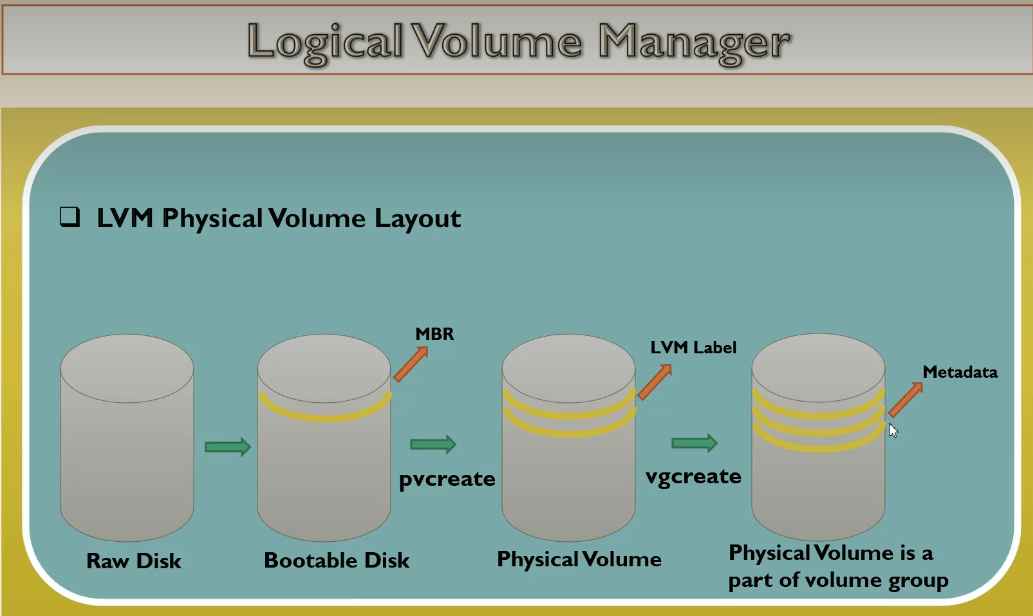
Physical Volume Layout
vgchange
| Command | Purpose |
|---|---|
vgchange -a y | Activate all volumes in the VG |
vgchange -a n | Deactivate all volumes in the VG |
vgchange -a y --partial | Activate only the available parts of the VG |
vgchange -a n --partial | Deactivate only non-available parts to recover |
vgchange -a y --sysinit | Used during early boot/initramfs |
vgextend
vgreduce