What is CORS?
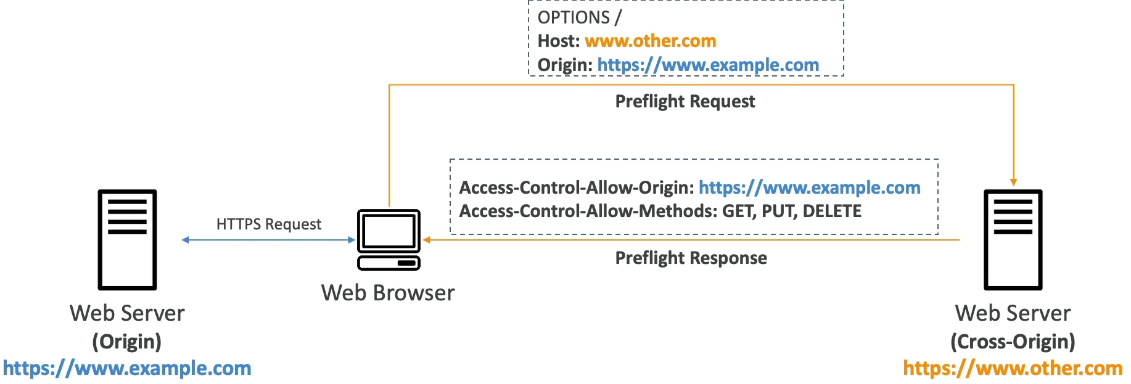
Stands for Cross-Origin Resources Sharing.
Origin: protocol (scheme) + host (domain) + port
https://www.example.com (protocol HTTPS, domain www.example.com, port 443 implied)
CORS is a web-browser mechanism to allow request to other origins while visiting the main origin.
Example: When you visit youtube, it wants to show you an ad that is hosted in a different origin, like ad.com. When Youtube sends you the index.html file, it has an ad in another website. So your browser sends a request to ad.com to get that ad. If ad.com didn’t enable CORS header, since your request is coming from another origin, it will reject
CORS Header example: Access-Control-Allow-Origin
CORS in S3
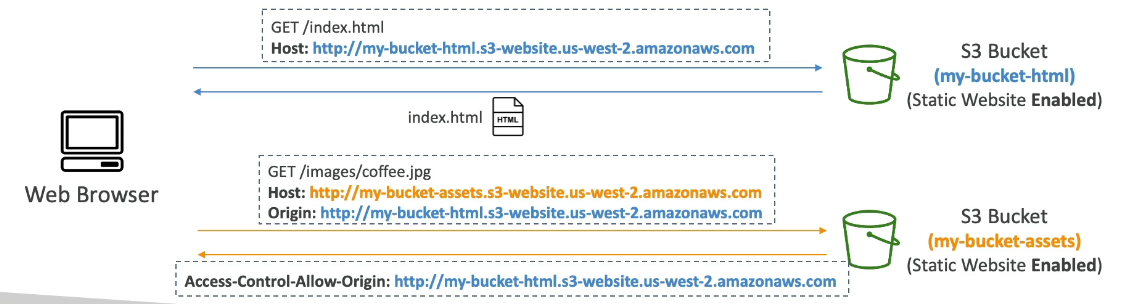
If a client makes a cross-origin request to your S3, you need to enable CORS header.
In order to enable CORS, you should go to bucket > permission > CORS